As we've already seen earlier, the Export Component UI has two modes:
- Compact Mode - For saving single chart, when one export component instance is present for each chart. In this mode, only a button and caption is visible for saving.
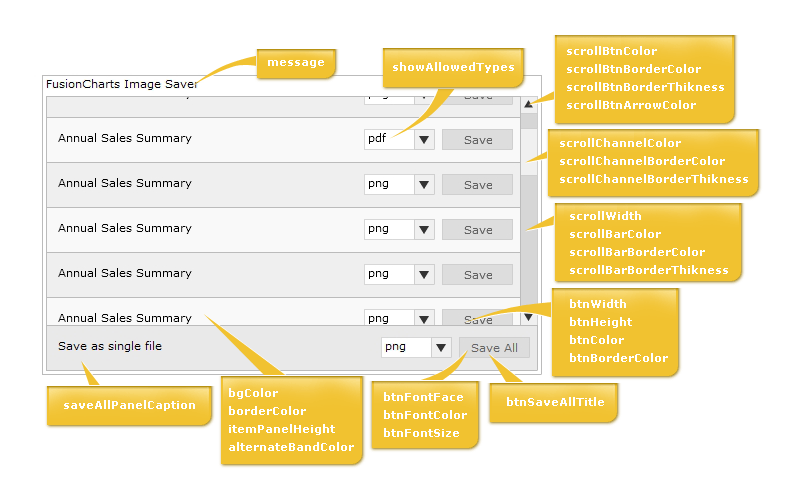
- Full Mode - For saving multiple charts, either individually or as a single file. In this mode, the user can select which chart to save along with the format.
In both modes, you can customize the colors, fonts and titles of export component. Before we get into the attributes that actually does this, let's first quickly look at what the various elements of the Export Component are. The following diagram highlights the important elements:
To configure any of the attributes of Export Component, the same needs to be specified in JavaScript (where the Export Component has been initialized). An example code is shown below:
<div id="fcexpDiv" align="center">FusionCharts Export Handler Component</div>
<script type="text/javascript">
	var myExportComponent = new FusionChartsExportObject("fcExporter1", "../../Charts/FCExporter.swf");
	//Customize the component properties
	//Width and height
	myExportComponent.componentAttributes.width = '400';
	myExportComponent.componentAttributes.height = '60';
	//Background color
	myExportComponent.componentAttributes.bgColor = 'ffffdd';
	//Border properties
	myExportComponent.componentAttributes.borderThickness = '2';
	myExportComponent.componentAttributes.borderColor = '0372AB';
	//Font properties
	myExportComponent.componentAttributes.fontFace = 'Arial';
	myExportComponent.componentAttributes.fontColor = '0372AB';
	myExportComponent.componentAttributes.fontSize = '12';
	//Message - caption of export component
	myExportComponent.componentAttributes.showMessage = '1';
	myExportComponent.componentAttributes.message = 'Export the chart first, and then click on this button to save';
	//Button visual configuration
	myExportComponent.componentAttributes.btnWidth = '200';
	myExportComponent.componentAttributes.btnHeight= '25';
	myExportComponent.componentAttributes.btnColor = 'E1f5ff';
	myExportComponent.componentAttributes.btnBorderColor = '0372AB';
	//Button font properties
	myExportComponent.componentAttributes.btnFontFace = 'Verdana';
	myExportComponent.componentAttributes.btnFontColor = '0372AB';
	myExportComponent.componentAttributes.btnFontSize = '15';
	//Title of button
	myExportComponent.componentAttributes.btnsavetitle = 'Save the chart'
	myExportComponent.componentAttributes.btndisabledtitle = 'Waiting for export';
	//Render the exporter SWF in our DIV fcexpDiv
	myExportComponent.Render("fcexpDiv");
</script>
See it live!
As you can see above, we've specified the various parameters for export component. This is done in the following syntax:
Component_Instance.componentAttributes.Parameter_name = 'Value';
e.g., myExportComponent.componentAttributes.width = '400';
Click here to see the list of attributes that can be customized for this component.